General

How to Set Min & Max WooCommerce Order Limits (& Stop Overselling)
General, Notas Interesantes

How to Set Min & Max WooCommerce Order Limits (& Stop Overselling)

It’s frustrating when customers place orders in your online store that are too small to be profitable, or so large that they deplete your stock and create shipping nightmares. Setting minimum and maximum order limits in WooCommerce solves this problem. It can help you keep your… Read More »
The post How to Set Min & Max WooCommerce Order Limits (& Stop Overselling) first appeared on WPBeginner.

How to Set Min & Max WooCommerce Order Limits (& Stop Overselling) Leer entrada »

Gary: Claudaborative Editing 0.4: Twice the fun!
General, Notas Interesantes

Gary: Claudaborative Editing 0.4: Twice the fun!

I’ve been taking an iterative approach to building Claudaborative Editing: build something to prove that the underlying concept works, then evolve on top of that. The first two iterations were answering a question I had: can an LLM genuinely improve the writing process? Along the way, I found a more important question: can it be done without contributing to the masses of generated slop we see?

Having seen the underlying idea working, I needed to answer the next question: can it be brought into the actual writing environment? Can it be useful, but keep out of the way?

Can you talk to an LLM from within WordPress, and have it talk back? I think I’m onto something, and it’s alot of fun.

Coming to a WordPress Near You

Naturally, the next step was to build a WordPress plugin that provided a straightforward interface to the LLM backend. You still install the tool to run with your local copy of Claude Code, but once it’s running, you can do everything directly from the block editor. The plugin is waiting to be approved for the WordPress.org plugin directory, but you can download it directly from the GitHub repo now.

Tools are easily accessible when you need them, but otherwise stay out of your way. You choose how much input you want the LLM to have in your writing: it can fix things up for you, or you can ask it to just leave notes and you’ll decide how you want to proceed. Personally, I prefer to do the work myself, but everyone can choose their level of comfort.

That said, one of the things I often forget to do when writing a post is to tag it properly. If I do remember, I’m never sure what to tag it with. By the time I get to publishing, I’m impatient just to get it out in the world! So, now there’s a button that’ll give suggestions right before publishing, letting you pick and choose which suggestions to use, and what to drop.

Planning is a Conversation

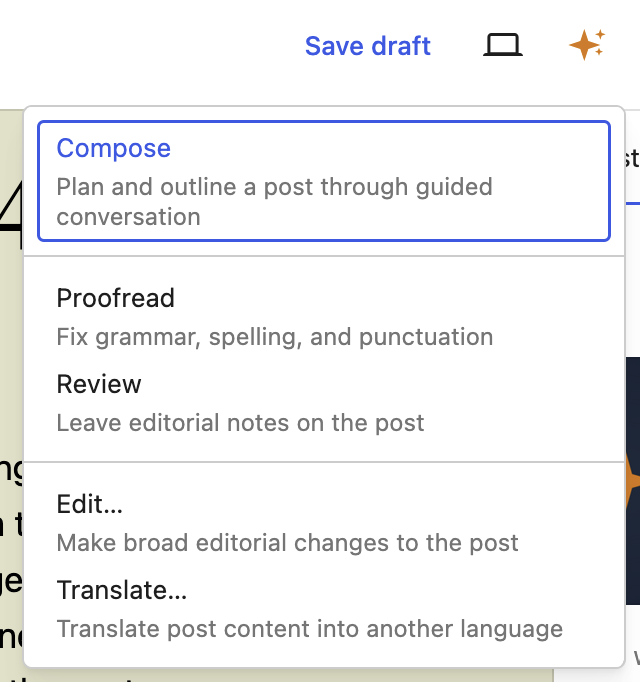
I always start Claude Code in planning mode, and I wanted that for posts, too. That’s where I started this post, and I can absolutely see myself using this every time I need to write a post. Not to do the writing for me, but to help me organise my thoughts. I opened the Compose mode in the sidebar, I had it summarise the changes that I’ve made in the last 2 weeks, and present a few options for how to collate them. Some I kept, some I dropped.

In a lot of ways, it’s more like a very advanced ELIZA, though rather than just reflecting your words back, it reflects your ideas back in a more structured form.

What’s next

I’ll be honest, I’m really happy with how this has turned out so far! I’d love to hear your feedback as you use it. What would you like to see here? I’ve already noted down a bunch of ideas that came up just while I was writing this post, so there are definitely more things to come!

Go ahead and give it a shot now:

npx claudaborative-editing start

Gary: Claudaborative Editing 0.4: Twice the fun! Leer entrada »

General, Notas Interesantes

Greg Ziółkowski: Research: Architecting Tools for AI Agents at Scale

Loading all available tools into an LLM’s context simultaneously is one of the most consequential architectural mistakes teams make when building AI integrations. The solution isn’t bigger context windows, and it’s progressive tool exposure: dynamically presenting only the tools relevant to each interaction. This post surveys the major patterns for doing so, drawn from production servers,

Greg Ziółkowski: Research: Architecting Tools for AI Agents at Scale Leer entrada »

General, Notas Interesantes

Weston Ruter: Adding an MCP Server to the WordPress Core Development Environment

I wanted to hook up Claude Code to be able to interact with my local wordpress-develop core development environment via MCP (Model Context Protocol). I couldn’t find documentation specifically for doing this, so I’m sharing how I did it here.

Assuming you have set up the environment (with Docker) and started it via npm run env:start.

1. Install & Activate the MCP Adapter plugin

The MCP adapter is not currently available as a plugin to install from the plugin directory. You instead have to obtain it from GitHub and install it from the command line. I installed it as a plugin instead of as a Composer package:

cd src/wp-content/plugins
git clone https://github.com/WordPress/mcp-adapter
cd mcp-adapter
composer install

Next, activate the plugin. Naturally, you can also just activate the “MCP Adapter” plugin from the WP admin. You can also activate it via WP-CLI (but from the project root working directory, since you can’t run this command from inside of the mcp-adapter directory:

npm run env:cli — plugin activate mcp-adapter

2. Register the MCP server with Claude

Here’s the command I used to register the wordpress-develop MCP server with Claude:

claude mcp add-json wordpress-develop –scope user ‘{«command»:»npm», «args»:[«–prefix», «~/repos/wordpress-develop/», «run», «env:cli», «–«, «mcp-adapter», «serve», «–server=mcp-adapter-default-server», «–user=admin»]}’

Here’s the JSON with formatting:

{
«command»: «npm»,
«args»: [
«–prefix»,
«~/repos/wordpress-develop/»,
«run»,
«env:cli»,
«–«,
«mcp-adapter»,
«serve»,
«–server=mcp-adapter-default-server»,
«–user=admin»
]
}

You may want to remove –scope user if you just want to register the MCP server for the one project. I tend to re-use the same WP environment for multiple projects (core and plugins), so I think it may make it easier for me to install at the user level instead.

You will also need to change the –prefix arg’s ~/repos/wordpress-develop/ value to correspond to where the repo is actually cloned on your system. I include this arg here so that when I start claude inside of a plugin project (e.g. inside src/wp-content/plugins/performance), it is able to successfully run the npm command in the package.json in the ancestor directory. You can remove this –prefix arg if this is not relevant to you.

Change the user from admin according to your needs.

3. Expose all abilities to MCP

Registered abilities are not exposed to MCP by default. This is a safety measure so that AI agents have to be explicitly allowed to perform potentially sensitive actions. So without any plugins active other than the MCP Adapter, prompting Claude with “discover abilities” results in:

No abilities found. The MCP server connection may be unstable. Try reconnecting again with /mcp.

However, since this is a local development environment, there is no concern about this (for me at least). To opt in all abilities to be exposed to MCP by default, you can use the following plugin code:

add_filter(
‘wp_register_ability_args’,
static function ( array $args, string $ability_id ): array {
if (
// Prevent exposing abilities in MCP except on a local dev environment.
wp_get_environment_type() === ‘local’
&&
// Omit abilities which the MCP Adapter already makes available itself.
! str_starts_with( $ability_id, ‘mcp-adapter/’ )
) {
$args[‘meta’][‘mcp’][‘public’] = true;
}
return $args;
},
10,
2
);

This is also available in a gist to facilitate installation via Git Updater.

Note: This filter does not currently apply if your ability is registered by extending Abstract_Ability in the AI plugin.

At this point, I can now open Claude (or re-connect to the MCP server) and see that it is able to see all (er, most) abilities that are registered on my wordpress-develop env with the same prompt “discover abilities”:

3 WordPress abilities available:

core/get-environment-info — Returns runtime context (PHP, database, WordPress version) with the ability name.

core/get-site-info — Returns site information (all fields or filtered subset)

core/get-user-info — Returns current user profile details

When I prompt “what’s the environment info?” it executes the core/get-environment-info ability via MCP and prints out:

Environment: local

PHP Version: 8.3.26

Database Server: 8.4.8 (MySQL)

WordPress Version: 7.1-alpha-62161-src

Now the environment just needs more abilities! I’ve filed a Performance Lab issue for us at the Core Performance table to work on adding abilities during Contributor Day at WordCamp Asia tomorrow.

Where I’ve shared this:

LinkedIn

Twitter

Bluesky

Threads

Mastodon
The post Adding an MCP Server to the WordPress Core Development Environment appeared first on Weston Ruter.


Weston Ruter: Adding an MCP Server to the WordPress Core Development Environment Leer entrada »

I Tested 10+ Best AI SEO Tools for WordPress to See Which Are Worth It
General, Notas Interesantes

I Tested 10+ Best AI SEO Tools for WordPress to See Which Are Worth It

You can’t just tell AI to ‘do SEO’ on your website and expect to rank at the top of Google. But the right tools can cut hours of repetitive work from your schedule. Many people think AI is just for writing blog posts, but the… Read More »
The post I Tested 10+ Best AI SEO Tools for WordPress to See Which Are Worth It first appeared on WPBeginner.

I Tested 10+ Best AI SEO Tools for WordPress to See Which Are Worth It Leer entrada »

Scroll al inicio